USB Charger Buying Guide 2026:
What Really Matters?
Before buying a USB charger, you should know these criteria. Our guide helps you make the right choice – without wasting money or risking your devices.
1. Charger Types: Single-Port, Multi-Port or Powerbank?
Three distinct form factors serve different needs. Here are the most important differences:
Single-Port USB-C Charger
A single-port charger dedicates all its wattage to one device – ideal for travel and portability. GaN technology makes 20W single-port chargers the size of a coin. Best for users who charge one device at a time and prioritise pocket-friendliness.
Multi-Port Charger
A multi-port charger (2–4 ports) handles several devices simultaneously from one power outlet. 65W or 100W desktop chargers can replace all your individual chargers with a single unit. Note: wattage is shared – a 65W charger may deliver 45W + 20W across two active ports.
Powerbank
A powerbank stores energy for on-the-go charging without a power outlet. Capacity in mAh determines how many charge cycles you get. 10,000 mAh typically provides 2–3 full smartphone charges. Look for USB-C input/output and PD support for the fastest recharge and discharge speeds.
2. GaN vs. Standard Silicon Chargers
GaN Chargers – The Best Choice for Most
- Up to 40% smaller than equivalent silicon chargers
- Run significantly cooler under load
- More energy-efficient (less wasted heat)
- GaN II and GaN5 now available at mainstream prices
- Virtually all quality brands have moved to GaN
Standard Silicon Chargers
- Cheaper entry price
- Larger and heavier for equivalent wattage
- Generate more heat under sustained load
- Adequate for basic 5W/10W charging needs
- Not recommended for 65W+ use cases
3. The 6 Most Important Buying Criteria
1. Wattage
Match the charger wattage to your highest-demand device. For MacBook Pro 16" users, 96–140W is needed for full-speed charging. For iPhone-only users, 20W is sufficient. A charger with more wattage than needed is perfectly safe – it just won't be cheaper.
2. Fast Charging Protocol
Check which protocol your device supports: Apple uses USB-PD. Samsung Galaxy uses PPS/SFC 2.0. Qualcomm Android uses QC 3.0/4+. A charger that supports your protocol charges significantly faster – sometimes 3× faster than a generic 5W charger.
3. Number and Type of Ports
USB-C ports carry more power and support faster charging. USB-A ports are useful for older devices, cables and accessories. For future-proofing, prioritise USB-C. A 2x USB-C + 1x USB-A configuration covers most households.
4. GaN Technology
For any charger above 30W, GaN is strongly recommended. The size, heat and efficiency advantages are real and meaningful. Check for GaN II or GaN5 for the latest generation.
5. Safety Certifications
Look for CE marking (EU required), GS certification, and brand safety features like MultiProtect (Anker) or equivalent. Avoid uncertified budget chargers for valuable devices.
6. Form Factor and Input Connector
Travel chargers should have a foldable plug (Klappstecker). Desktop chargers may use a fixed cable. Check physical size if you are using a tight power strip.
4. Fast Charging Standards Explained
USB Power Delivery (PD)
The universal standard for USB-C fast charging. PD 3.0 covers up to 100W, PD 3.1 up to 240W. Compatible with all Apple devices, most Android phones, laptops. Best for: iPhone, iPad, MacBook, Android flagships.
Quick Charge (QC) 3.0 / 4+
Qualcomm's proprietary protocol. QC 3.0 is extremely widespread in Android devices. QC 4+ is backwards compatible with PD. Best for: Snapdragon Android phones, Kindle Fire, older iPads.
PPS (Programmable Power Supply)
Samsung's Super Fast Charging 2.0 (25W) uses PPS. Required to achieve maximum charging speed on Galaxy S21–S24. Only chargers supporting PPS (like Belkin BoostCharge Pro) unlock this speed. Best for: Samsung Galaxy S/Z series.
5. Our Recommendations by Use Case
iPhone User – One Charger for Home & Travel
Anker 511 Nano Pro 20W – ultra-compact, 20W PD, pocket-sized. Charges iPhone 15 fully in ~1 hour.
Multiple Devices at a Desk
Baseus GaN5 Pro 65W – 65W, 3 ports, includes USB-C cable, excellent price. Replaces 3 separate chargers.
MacBook Pro 16" Power User
UGREEN Nexode 140W – 140W PD 3.1 natively charges MacBook Pro 16" at full speed while 3 other devices charge simultaneously.
Samsung Galaxy User
Belkin BoostCharge Pro 25W – PPS/SFC 2.0 support for maximum Galaxy charging speed, plus Connected Equipment Warranty.
Travelling / Festival / Camping
HARIBO Powerbank 10,000 mAh – 3 ports, PD 18W fast charging, airline-compliant capacity, eye-catching design.
Frequently Asked Questions
The most important questions about buying a USB charger – answered briefly and clearly.
Buy Directly: Our Top Recommendations
All models with current prices on Amazon.
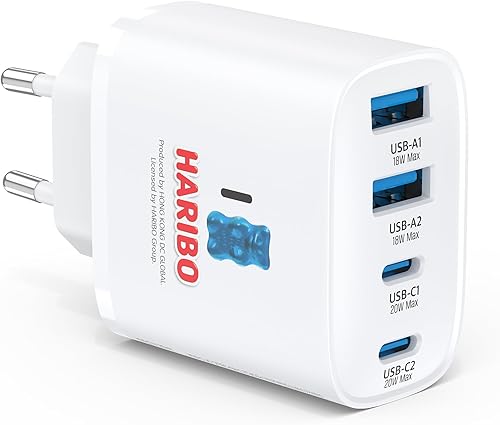
HARIBO USB Ladestation 5-Port 40W
Bunte 5-Port Ladestation im HARIBO-Design – für die ganze Familie gleichzeitig laden
- 5 Ports – bis zu 5 Geräte gleichzeitig laden
- Lustiges HARIBO-Design als Geschenkidee
- Kompakt und standfest
ca. 25–35 €
View on Amazon →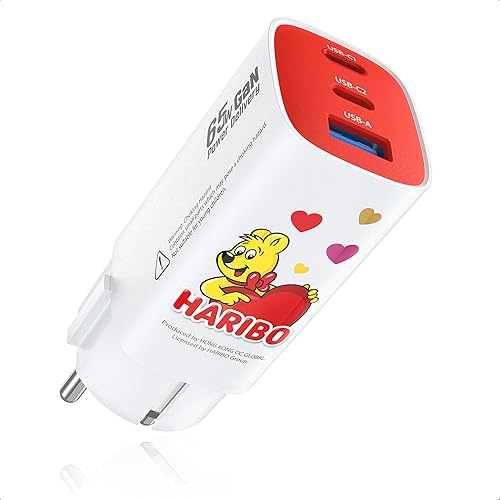
HARIBO USB-C Schnellladegerät 65W
Kompaktes 65W GaN USB-C Schnellladegerät im HARIBO-Design – lädt Laptop, Tablet und Smartphone
- 65W PD 3.0 – lädt MacBook Air vollständig
- GaN-Technologie: klein aber leistungsstark
- Zusätzlicher USB-A Port für Zweitgerät
ca. 14–18 €
View on Amazon →
HARIBO Powerbank 10.000 mAh
10.000 mAh Powerbank im HARIBO-Design – 3-fache Smartphone-Ladung unterwegs
- 10.000 mAh – ca. 3 Smartphone-Ladungen
- Gleichzeitig 3 Geräte laden
- USB-C Schnellladen (PD 18W)
ca. 20–30 €
View on Amazon →